
w3m is a text-based web browser that runs in a terminal.
It’s free and open-source; licensed under the MIT license.
Instead of using a full graphical browser (like Chrome, Firefox, etc.), w3m lets us browse webpages from the command line (terminal), rendering them as text (optionally with minimal graphics) rather than as a full visual/GUI page.
Unlike the most basic text browsers, w3m supports things like tables, frames, and (on suitable terminals) even images inline.
w3m can also be used as a general-purpose pager for viewing plain text or formatted output from commands/files (similar to less or more).
We can navigate using arrow keys or other keybindings and we may also get mouse support.
It features bookmarks, basic browsing history and basic tabs (in a terminal sense, though functionality is more limited than full GUI browsers).
This can be especially helpful if we are running on a system without a graphical environment (e.g., SSH into a server, a minimal Linux install, a low-resource machine).
Because it doesn’t load heavy CSS, JavaScript, multimedia, or full graphics (or only minimal ones), it’s much lighter than a full browser.
This is good for quick lookup, server-side work, or limited hardware.
Because w3m can dump formatted HTML to plain text, it can be used in scripts to fetch and parse webpages without needing a full browser.
If the usual graphical browser fails (display server issues, remote server, etc.), w3m offers a reliable alternative.
Installation:
sudo apt-get install w3m w3m-img
The extra w3m-img helps enable inline image display.
Then to open a webpage:
w3m https://example.com
It can help when we want fast access to textual content on a minimal machine or low bandwidth.
I just really like the aesthetics of terminal-based tools.
Enjoy #linux
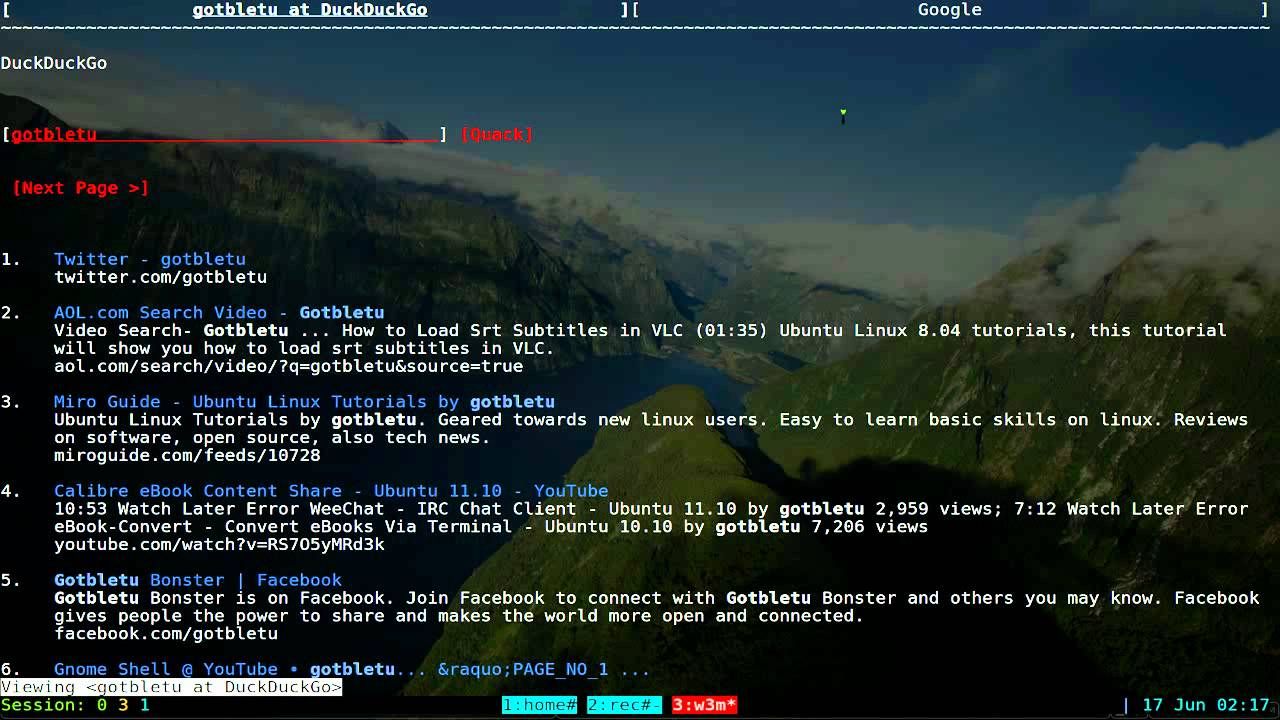
Well, that was exciting. See you in the next one!